


our own cms/
A content management system with no plugins, no page builder and nobody else’s roadmap
Hydra is the bespoke CMS (content management system) behind our website design and development. We designed it, we write every line of it, and we look after it on every site that runs it. It gives you and your team one calm, fast place to edit pages, news, images, forms and events, while your website itself stays a hand-built design that looks exactly the way it was meant to.
This website runs on Hydra. Every page you are reading, the news, the reviews and the enquiry form are all edited in it.
- Built in the UK
- No third-party plugins
- Updated every night
- SEO checks built in
- Cookieless analytics
- Full audit trail
Talk to us about a Hydra website See our website design service
at a glance/
Everything your website needs, in one place you’ll actually enjoy using
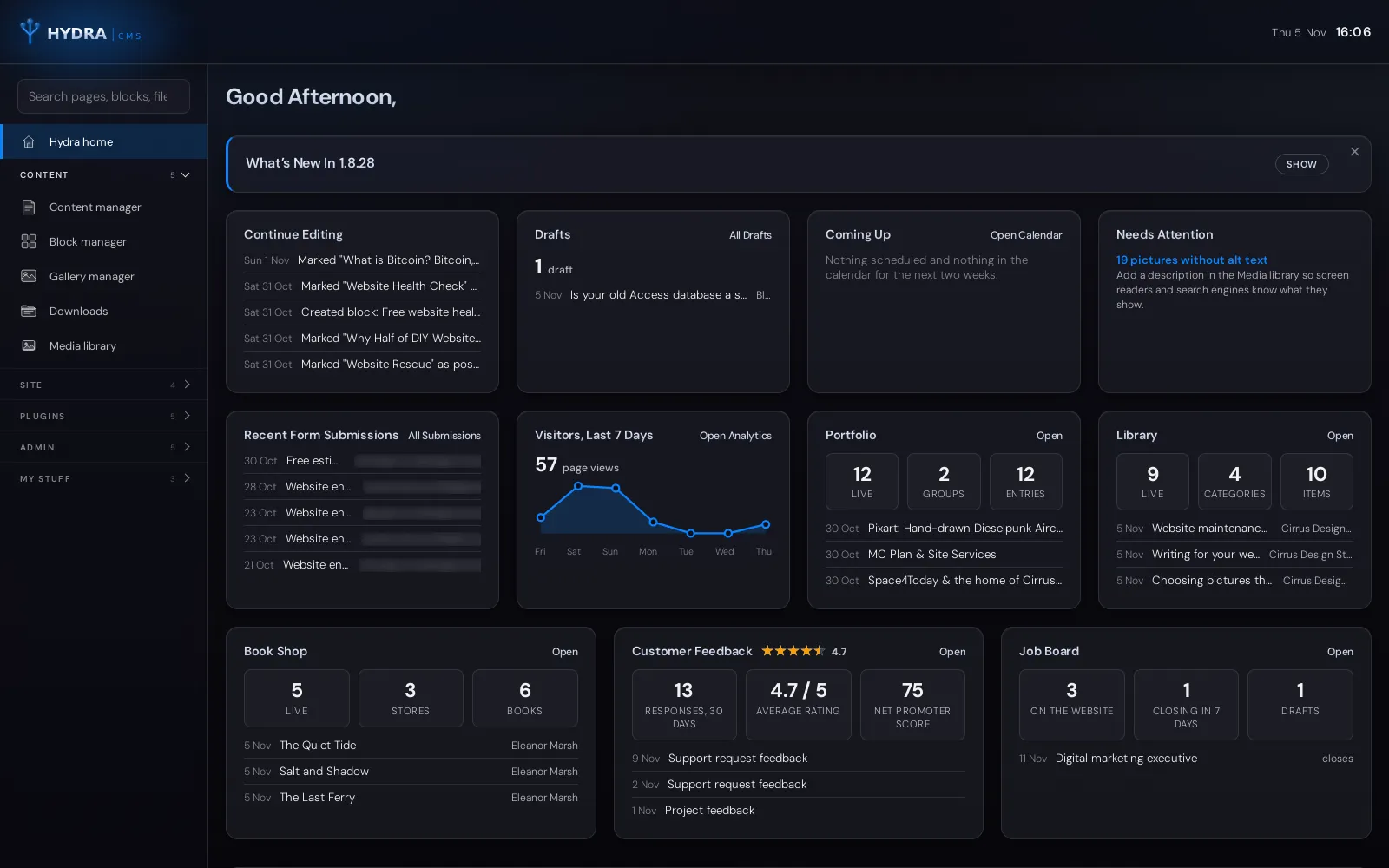
Sign in and the dashboard tells you what needs doing: what you were last editing, drafts waiting to be finished, pages scheduled to go live, the latest enquiries and a week of visitor numbers. Anything that needs attention, such as a picture without alt text or a form with nobody to send to, links straight to where it’s fixed.
- 0Third-party plugins
Every feature is part of Hydra itself, written and tested by us, so there’s no plugin to go out of date, clash with another or open a security hole.
- NightlyAutomatic updates
New releases install themselves overnight on every Hydra site. You never see an “update available” nag, and nothing needs doing on your side.
- 1Login for everything
Pages, blog posts, images, downloads, forms, events, FAQs and visitor statistics all live in one system, with one search box over all of it.
what it does/
What Hydra does for your business
01/
Pages, news and groups
Write in a clean editor, drop pictures straight in, schedule a page or article to go live on a date, and preview drafts before anyone else sees them. Groups give your pages tidy addresses such as /services/website-design/.
02/
Reusable blocks
Phone numbers, addresses, opening hours and announcements are written once as blocks and used anywhere. Change the block and every page that uses it updates. Dated blocks appear and disappear on their own.
03/
Images done properly
Photos are shrunk in your browser before upload, converted to fast-loading WebP, resized for banners and thumbnails, and kept in one media library you can search, reuse and caption.
04/
Forms and enquiries
Build enquiry forms field by field, choose who receives them and send visitors an automatic acknowledgement. Every submission is kept, searchable and exportable, so an enquiry is never lost in an inbox.
05/
SEO checks as you type
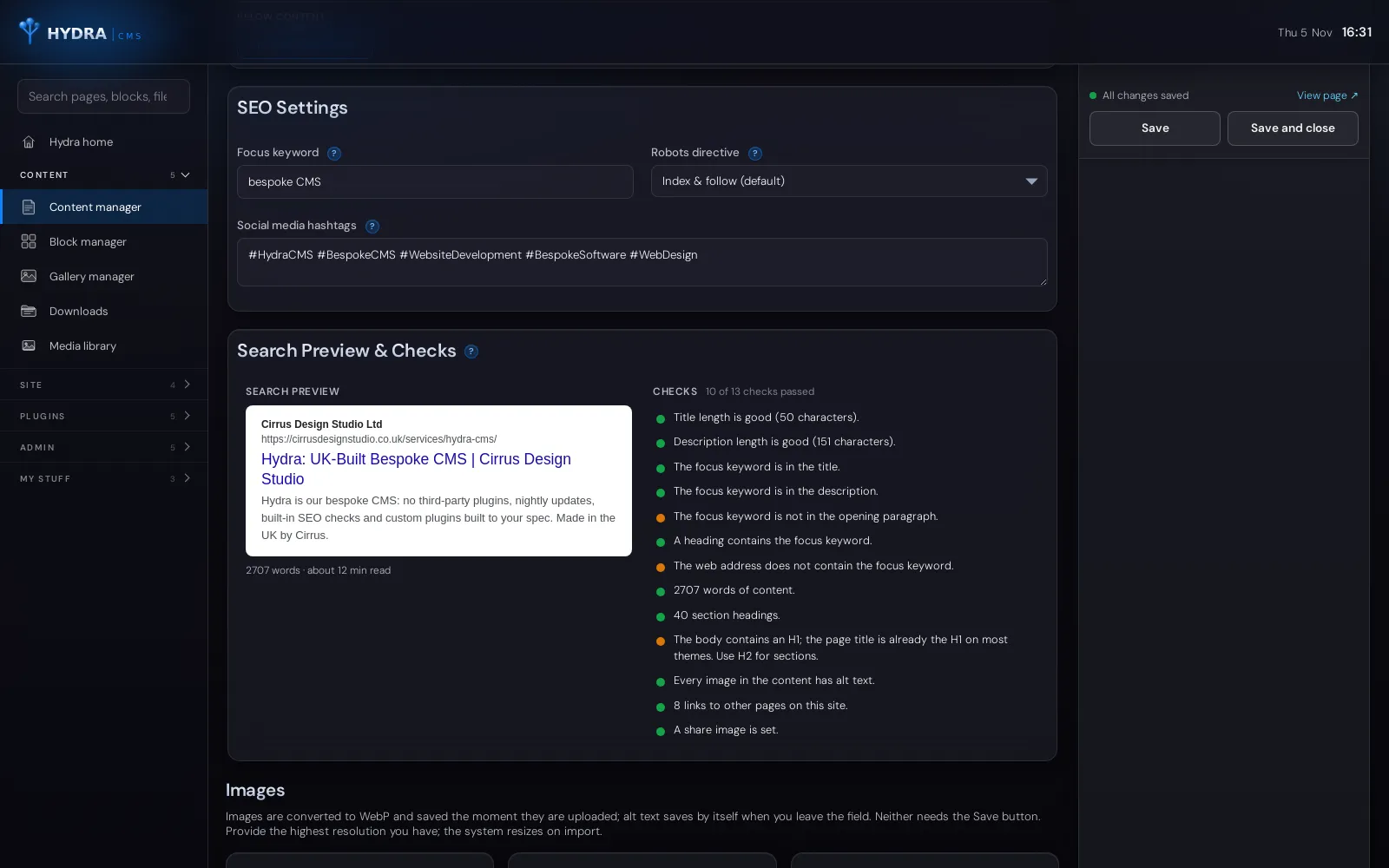
A search-result preview and a live checklist cover your title, description, focus keyword, headings, word count, internal links and image alt text. Structured data for search engines is written for you.
06/
Cookieless visitor statistics
Built-in analytics count your visits without cookies and without storing IP addresses, so you can see what’s working without a consent banner getting in the way.
07/
Events, FAQs and downloads
A calendar with venues, tickets and Google-ready event data; a questions and answers manager with follow-ups; and download groups for brochures, price lists and forms.
08/
Addresses that never break
Rename a page and its address stays put. Move it on purpose and Hydra records a redirect from the old one, so links from Google, other sites and bookmarks keep working.
inside hydra/
A look inside Hydra
Ten screens from Hydra itself, from the dashboard you see when you sign in to the plugins that add feedback forms, job adverts, books and documents. Use the arrows or swipe to move through them. Our own names and email addresses are blurred, and the plugin screens use example content.
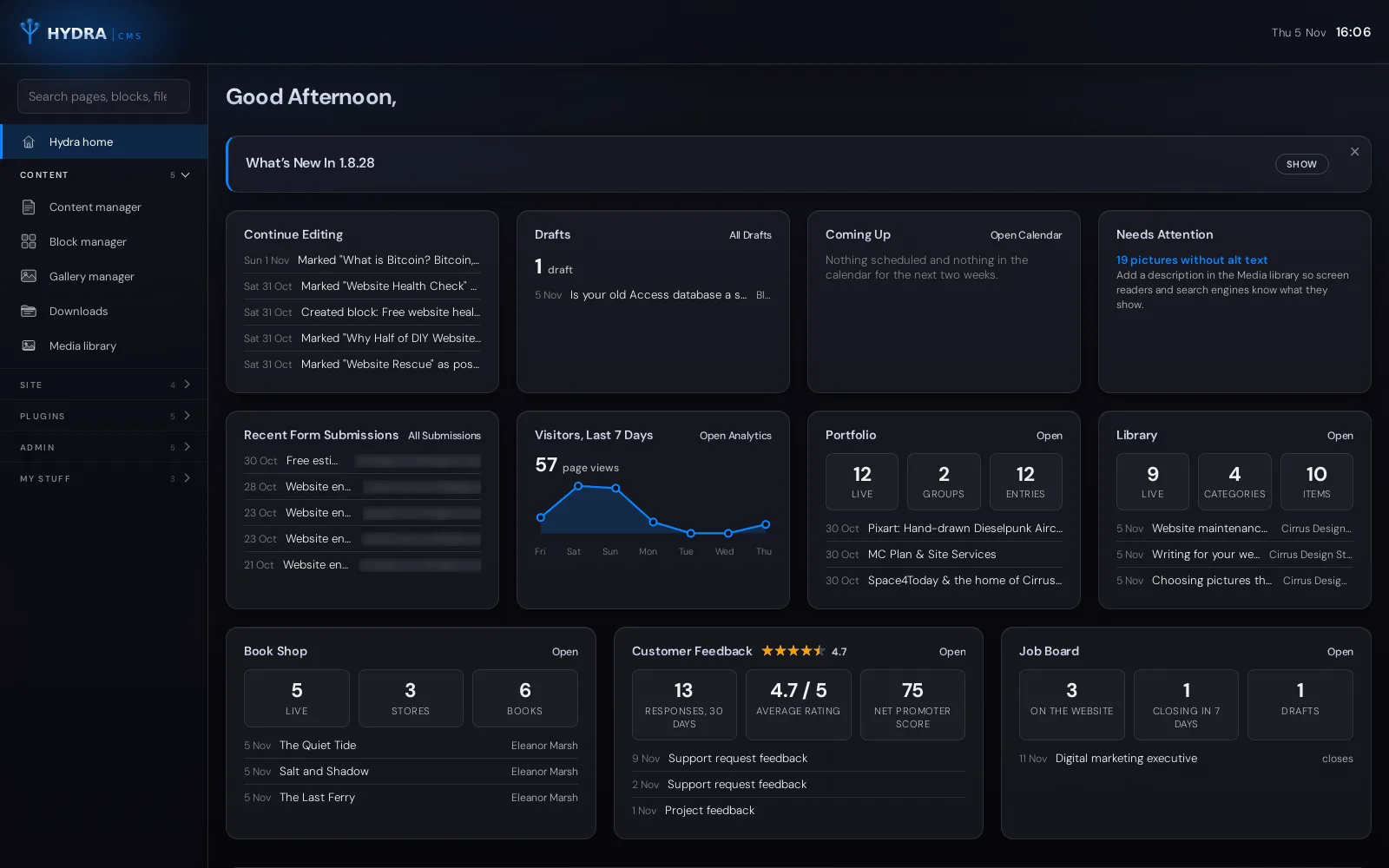
The Hydra dashboardSign in and Hydra tells you what needs doing: what you were last editing, drafts waiting to be finished, what’s coming up, new enquiries, a week of visitor numbers and a summary from every plugin. Anything that needs attention links straight to where it’s fixed. 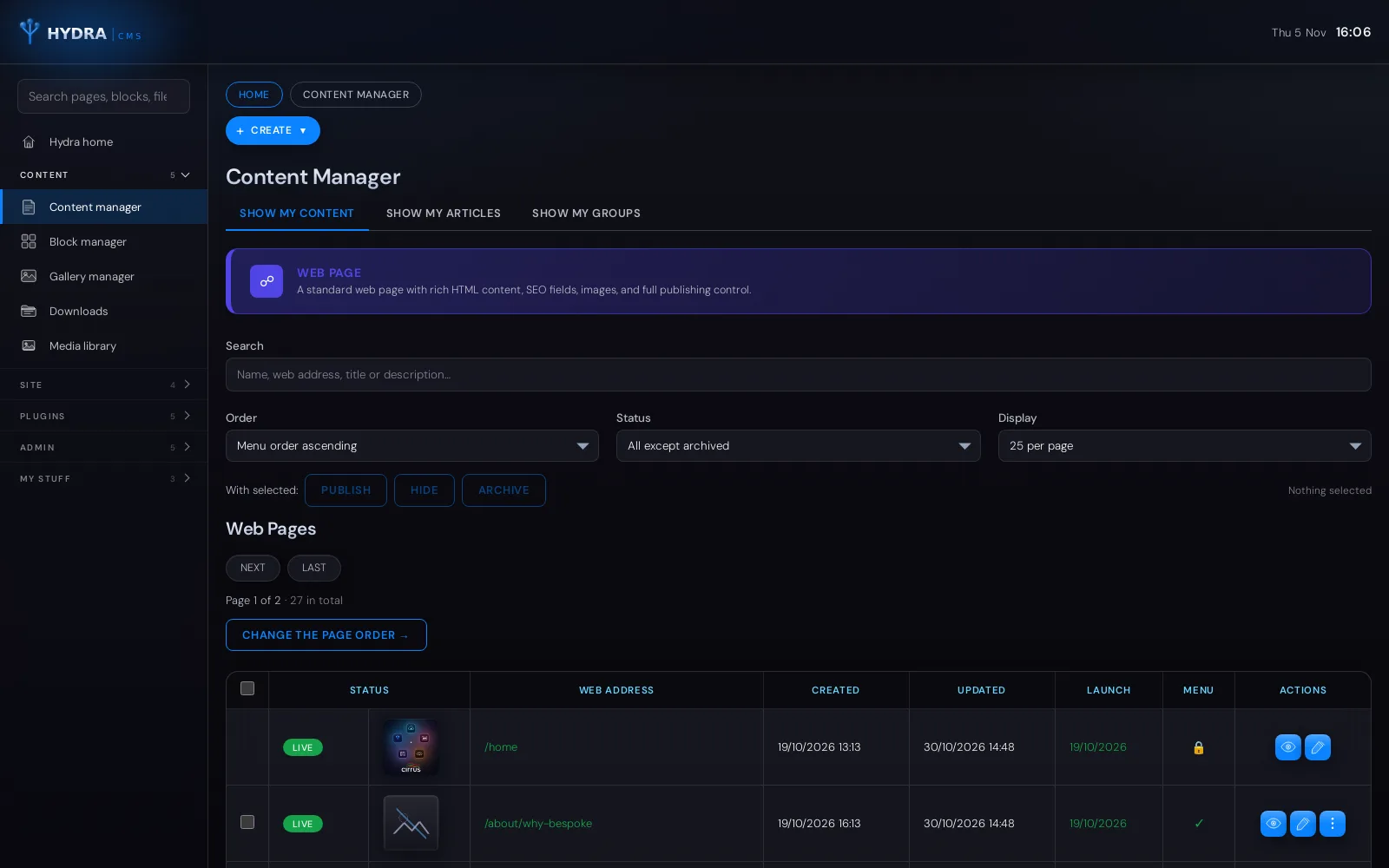
Pages, news and groupsEvery page and article in one list, with its status, go-live date and place in the menu. Search, filter and publish, hide or archive several at once, and drag pages into menu order. 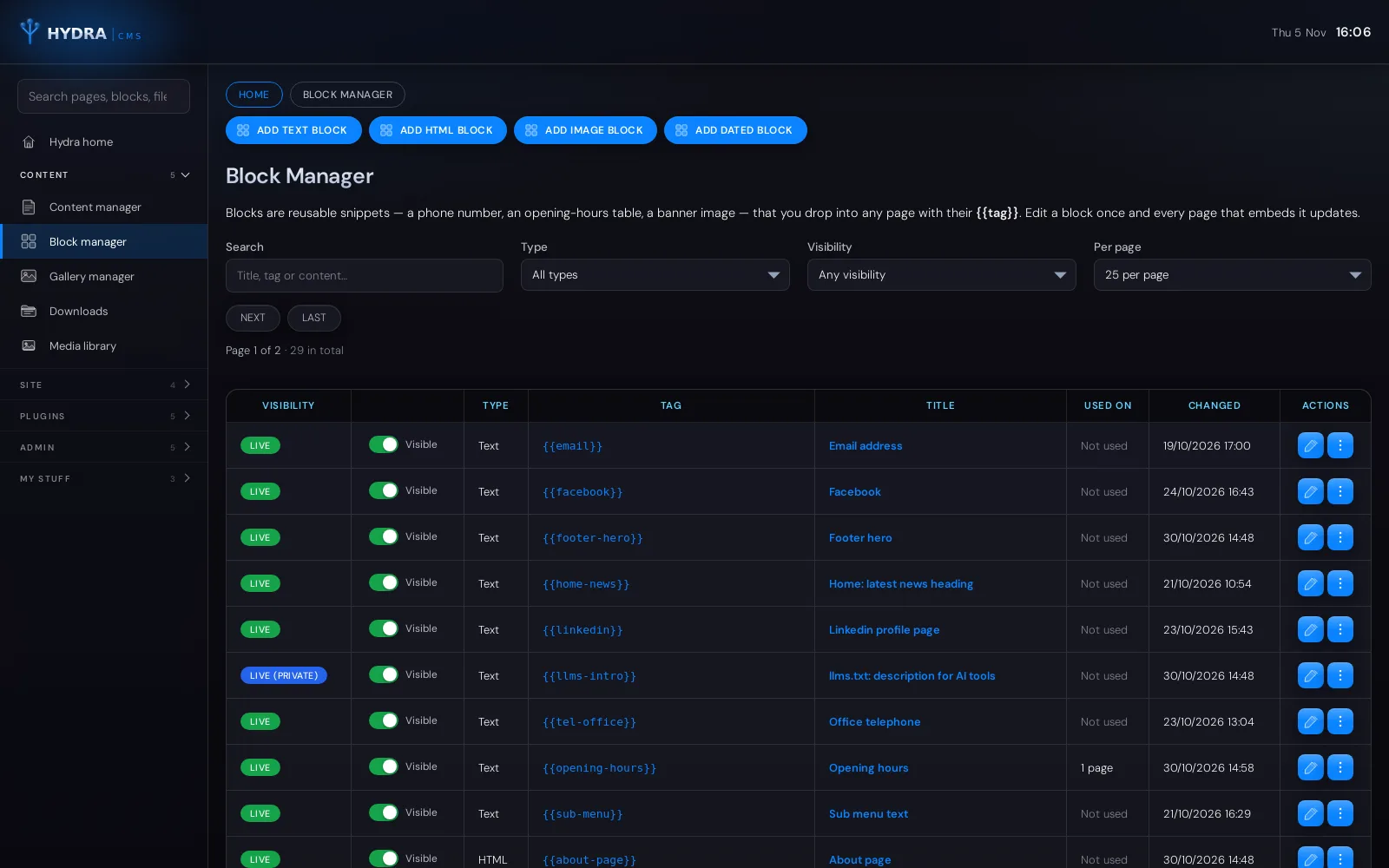
Reusable blocksPhone numbers, addresses, opening hours and announcements are written once as blocks and used anywhere on the site. Change a block and every page that uses it updates; dated blocks appear and disappear on their own. 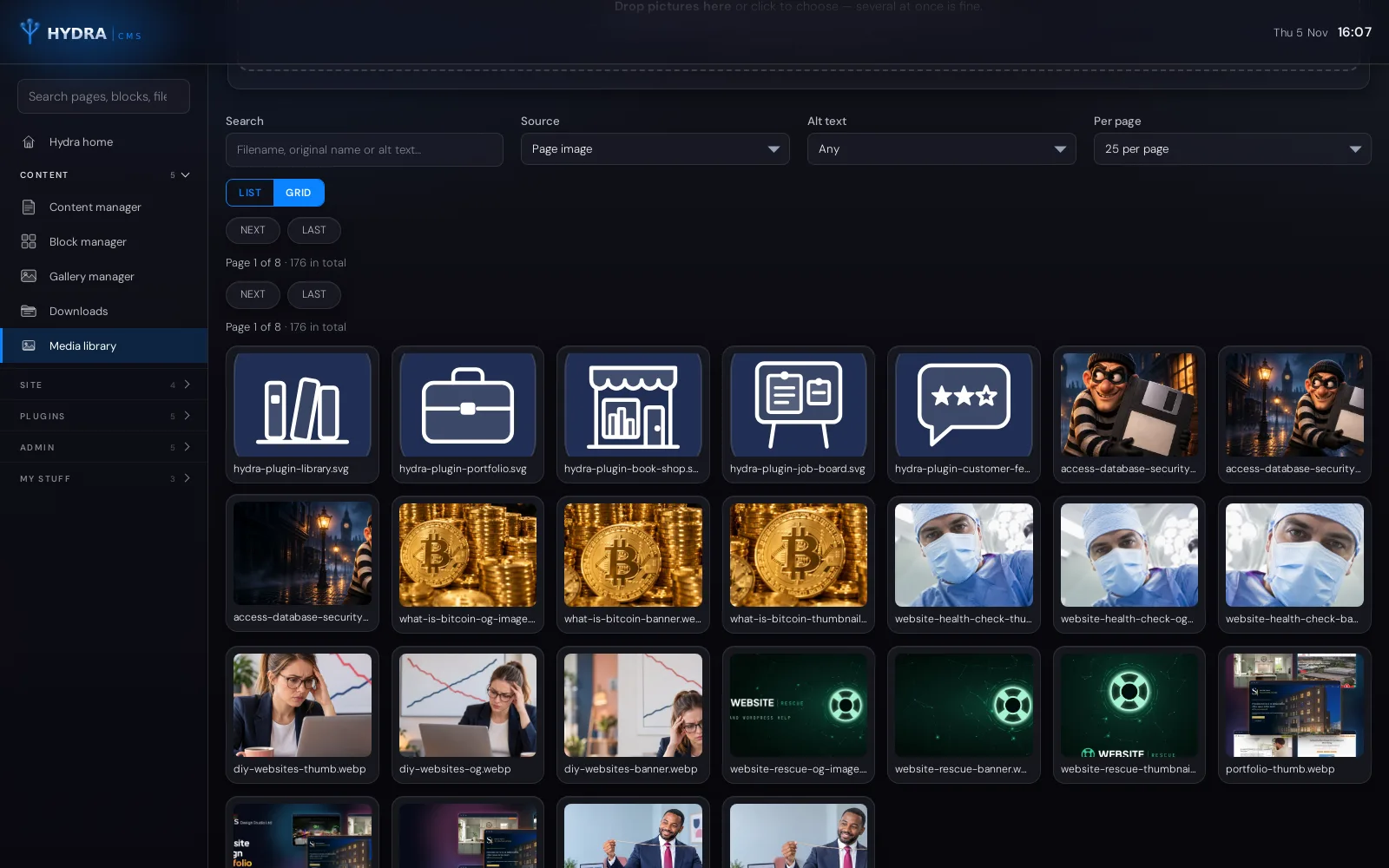
Media libraryEvery picture on the site in one searchable library. Uploads are resized and converted to fast-loading WebP automatically, and each picture shows where it is used, so nothing in use can be deleted by mistake. 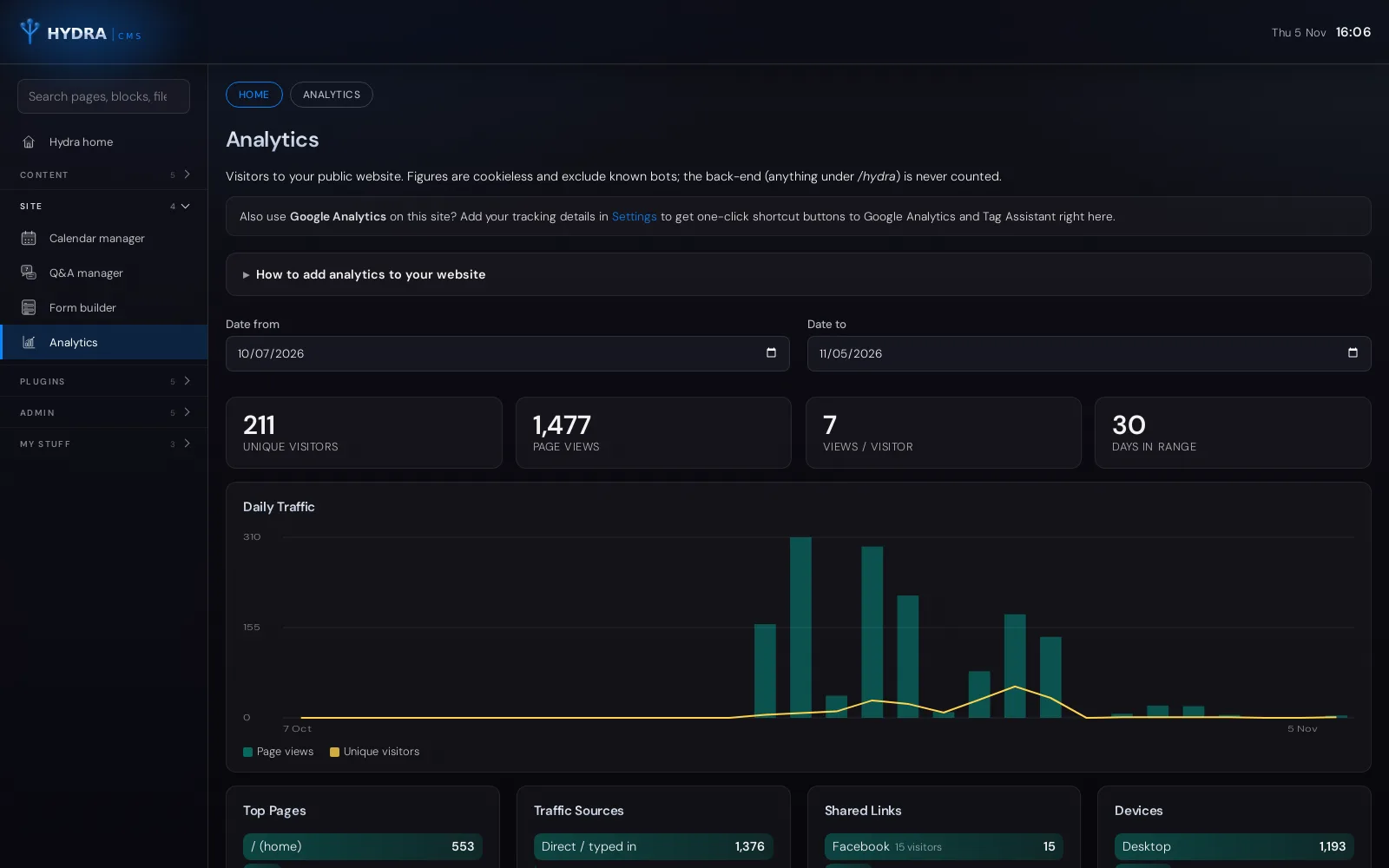
Cookieless visitor statisticsBuilt-in analytics count visitors, page views, top pages, traffic sources, shared links and devices without cookies and without storing IP addresses, so there is no consent banner in the way. 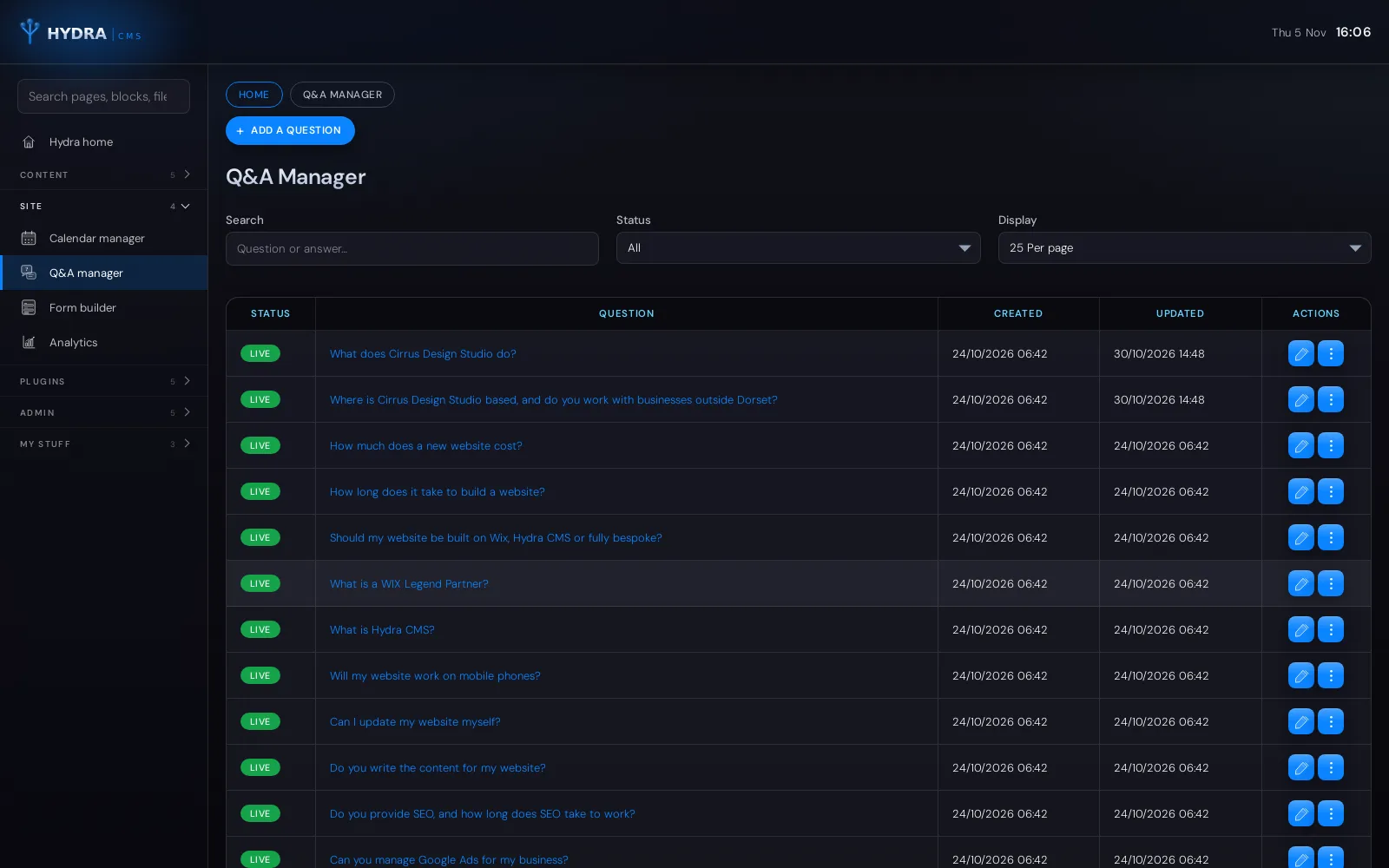
Questions and answersA questions and answers manager for the things customers ask most. Answers are written once and can be shown on any page, with the structured data search engines read. 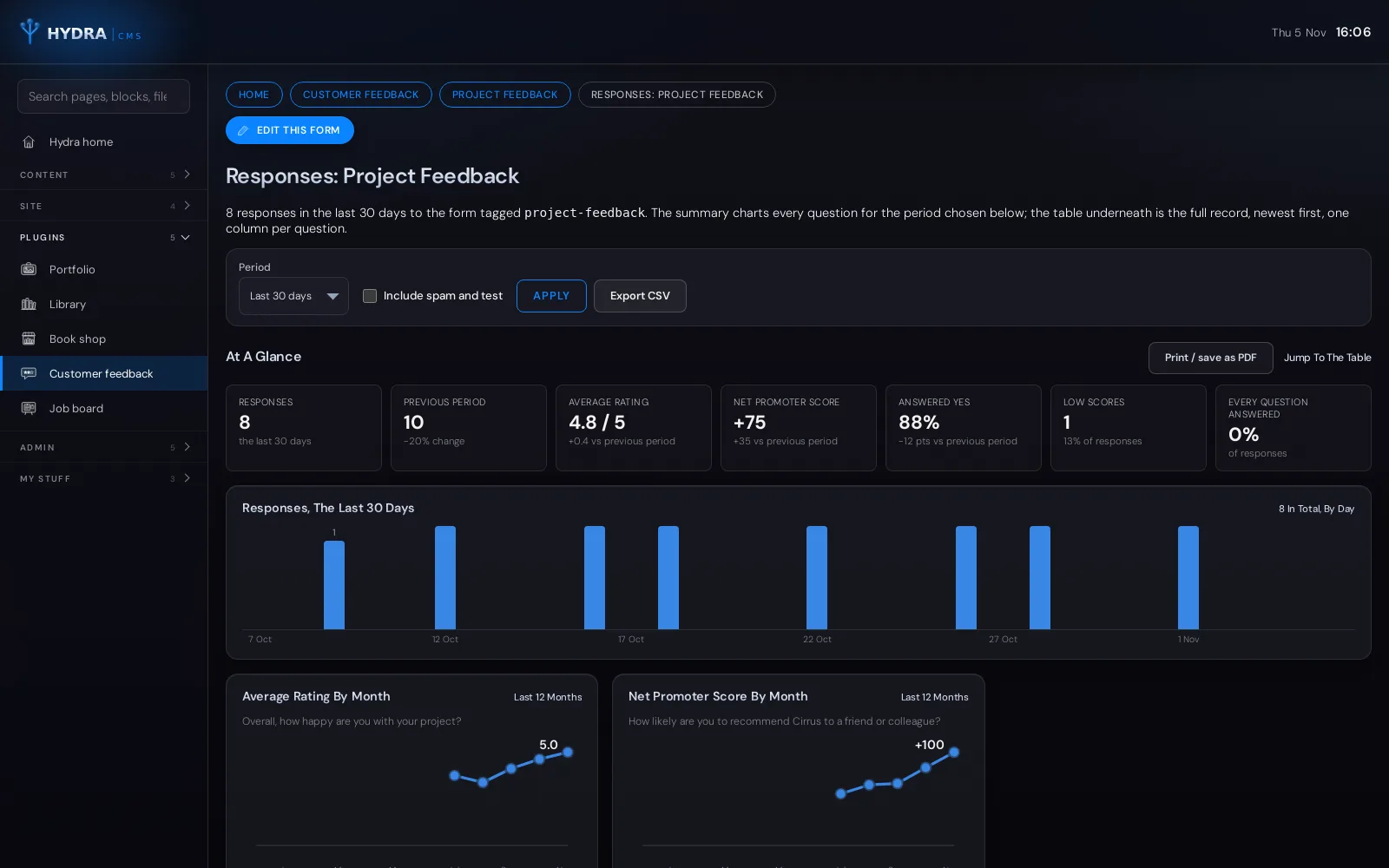
Customer Feedback pluginFeedback forms with star ratings, scales and free text. Every response is charted for you: average rating, Net Promoter Score, low scores and month-by-month trends. Shown here with example data. 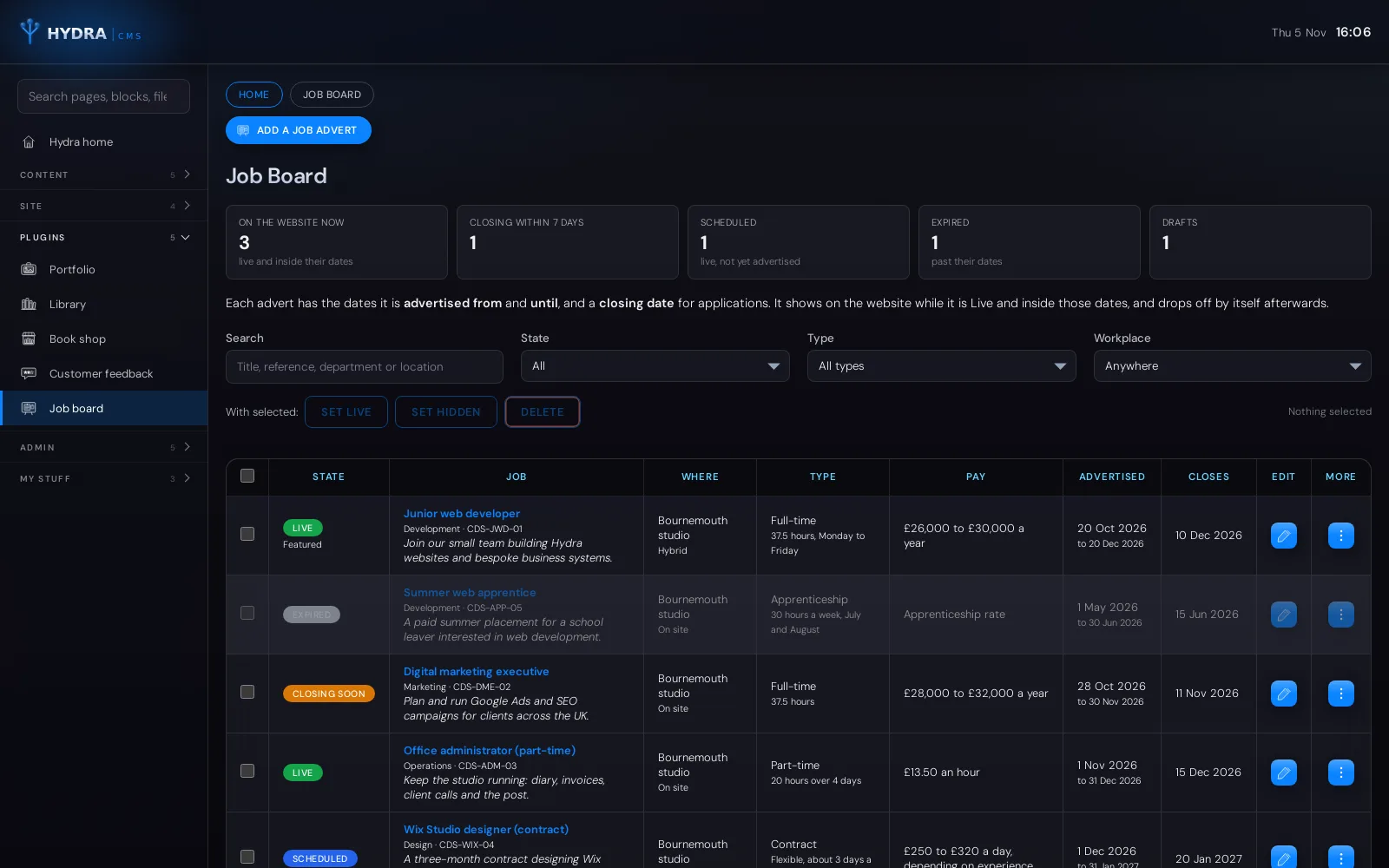
Job Board pluginJob adverts with advertise-from, advertise-until and closing dates, so vacancies appear, show “closing soon” and drop off the website by themselves. Shown here with example vacancies. 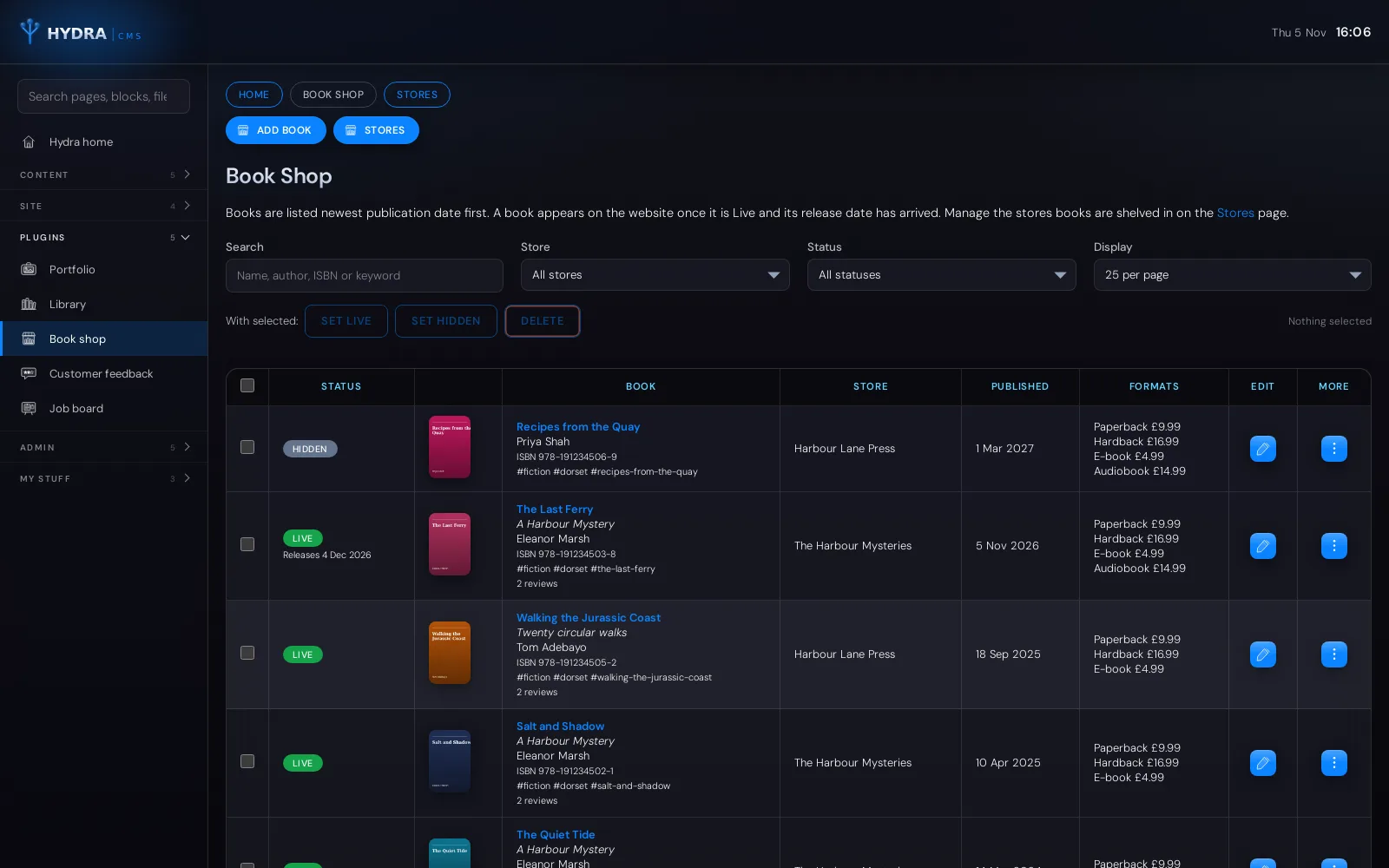
Book Shop pluginFor authors and small publishers: every book with its cover, ISBN, formats, prices, purchase links and reviews, grouped into stores, with release dates for new titles. Shown here with example books. 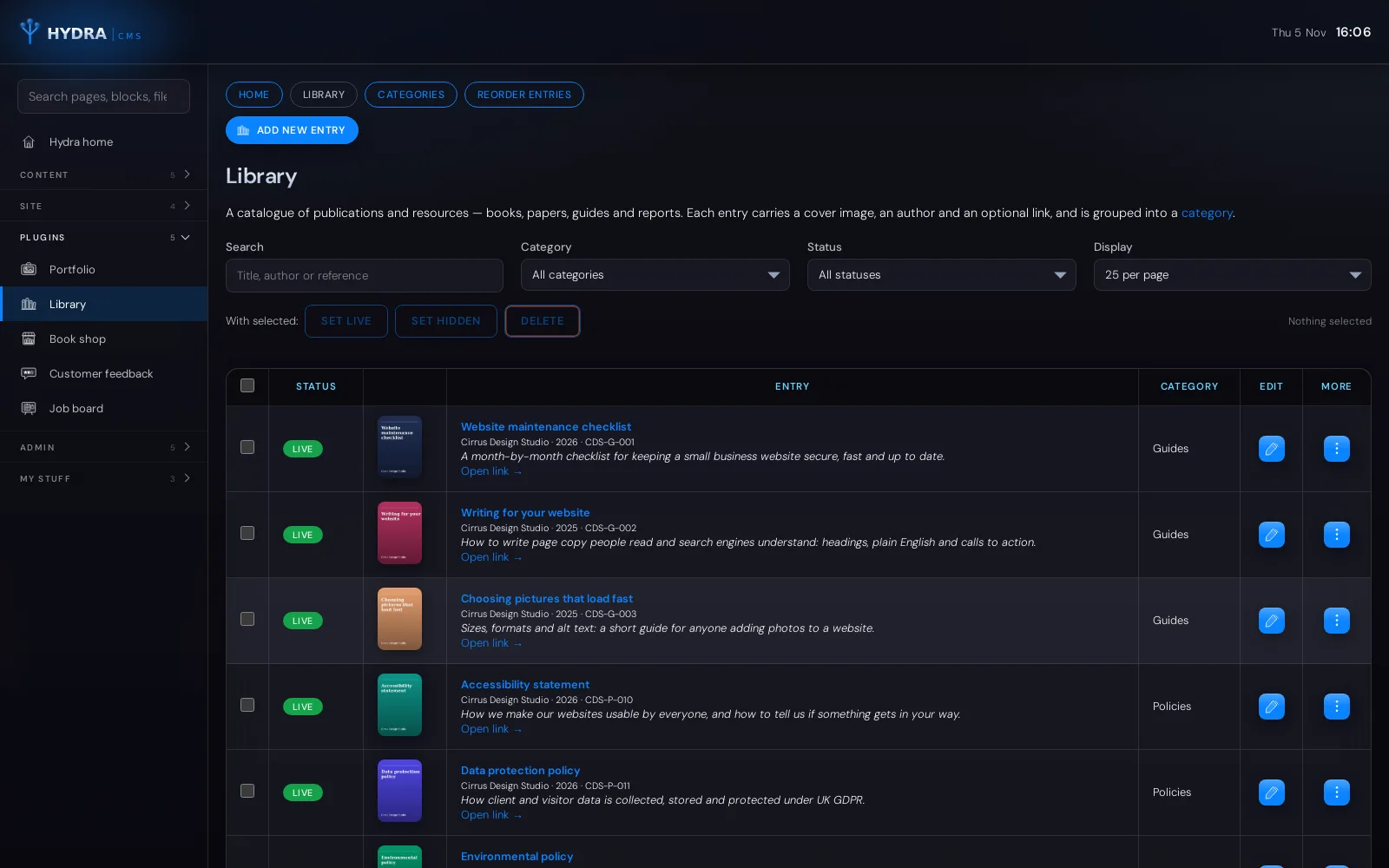
Library pluginA tidy catalogue of guides, policies, reports and newsletters, each with a cover, author, year and reference, in categories you name and order. Shown here with example documents.
hydra plugins/
Optional Hydra plugins for the extra things your business does
Hydra covers what most websites need on its own. When yours needs a little more, such as feedback forms, job adverts or a catalogue of your books, these optional plugins add it. Like Hydra itself, every one is written and looked after by us, not bought from a marketplace.
We switch a plugin on for your site, and you manage its content from the same admin screens as your pages. The way it appears on your website is built into your site’s design by us, so it looks as though it was always part of it. Everything runs on your own hosting, and nothing is sent to anyone else unless you choose: Anthropic’s Claude is used only if you switch on the optional comment summary in Customer Feedback.

Customer Feedback
Ask your customers what they think, and actually learn from it.
Build feedback forms from the questions you want answered: star ratings, 1 to 5 and 0 to 10 scales, yes or no, multiple choice and free text. Each form gets a tag that we build into your website, or a QR code for receipts and table cards. Every response is kept with the form and charted for you: average ratings, Net Promoter Score, trends month by month, and the comments that need a reply.
- Thirteen question types, a follow-up question that appears only after a low score, and one response per visitor if you want it
- Charts, period comparisons and a printable PDF summary for every form
- Email alerts for every response or only the low scores, an automatic thank-you to the customer, and a weekly or monthly summary report
- Spam and test responses can be flagged out, data exported as a spreadsheet, and an optional Claude summary of comments when you choose to switch it on

Job Board
Advertise vacancies properly, with dates that look after themselves.
Write a job advert once and let the dates do the work: say when it should start showing, when it should stop, and when applications close. Adverts carry everything a candidate needs, from the pay and hours to the person specification and how to apply, and they drop off the website on their own when the time comes. Structured data is included so Google can list the vacancy.
- Advertise-from, advertise-until and closing dates, with “closing soon” shown in the final week
- Pay as a range, a single figure or plain wording; on site, hybrid or remote
- Rich-text description, responsibilities, person specification and benefits
- Apply by link or email, a named contact, and a copy function to re-run a vacancy

Book Shop
Your books, your formats, your prices, all in one place.
Made for authors and small publishers. Every book has a cover, author, publisher, ISBN, description and reviews, and can be sold in as many formats as you like, each with its own price and purchase link: paperback, hardback, e-book, audiobook. Group books into stores, set a release date for a launch, and the new title appears on the day.
- Formats with individual prices and links, so each edition points where it sells
- ISBN checked and stored correctly; reader and press reviews with star ratings
- Release dates for pre-launch titles, and Live or Hidden control per book
- Stores to shelve books by series, imprint or shop

Portfolio
Show your work, in the order you want it seen.
A gallery of projects for designers, makers, builders, photographers and anyone else whose work speaks for them. Each entry has a picture with proper alt text, a title, a description, keywords and a link, and belongs to a group so visitors can browse by discipline, client or year. Drag entries into order within each group.
- Groups with their own order, dragged into place
- A picture on every entry, resized and converted automatically
- Keywords for filtering and an optional link to the live project
- Live or Hidden per entry, with bulk changes across many at once

Library
A tidy catalogue of the documents people keep asking for.
For clubs, charities, practices and any organisation with publications to share: reports, guides, policies, newsletters, papers. Each entry has a cover, author, year, reference and description, with a link to the document itself, and sits in a category you define. Search and filter make the right document quick to find.
- Categories you name and order
- Cover image, author, year and reference on every entry
- A link to the document or an external page
- Live or Hidden per entry, duplicate for a new edition, and bulk changes
talk to us/
Switch a plugin on
Plugins are included with Hydra and switched on per site in a day, with training for your team. Tell us which ones fit and we will set them up.
built for editors/
Designed for the people who keep your website up to date
Most of the people who edit a website aren’t web developers, and Hydra doesn’t expect them to be. The editor shows your writing on the left and everything about publishing on the right: status, go-live date, menu, group and address. Saving keeps you where you are, Ctrl+S works even mid-sentence, and Hydra warns you before you leave with unsaved changes.
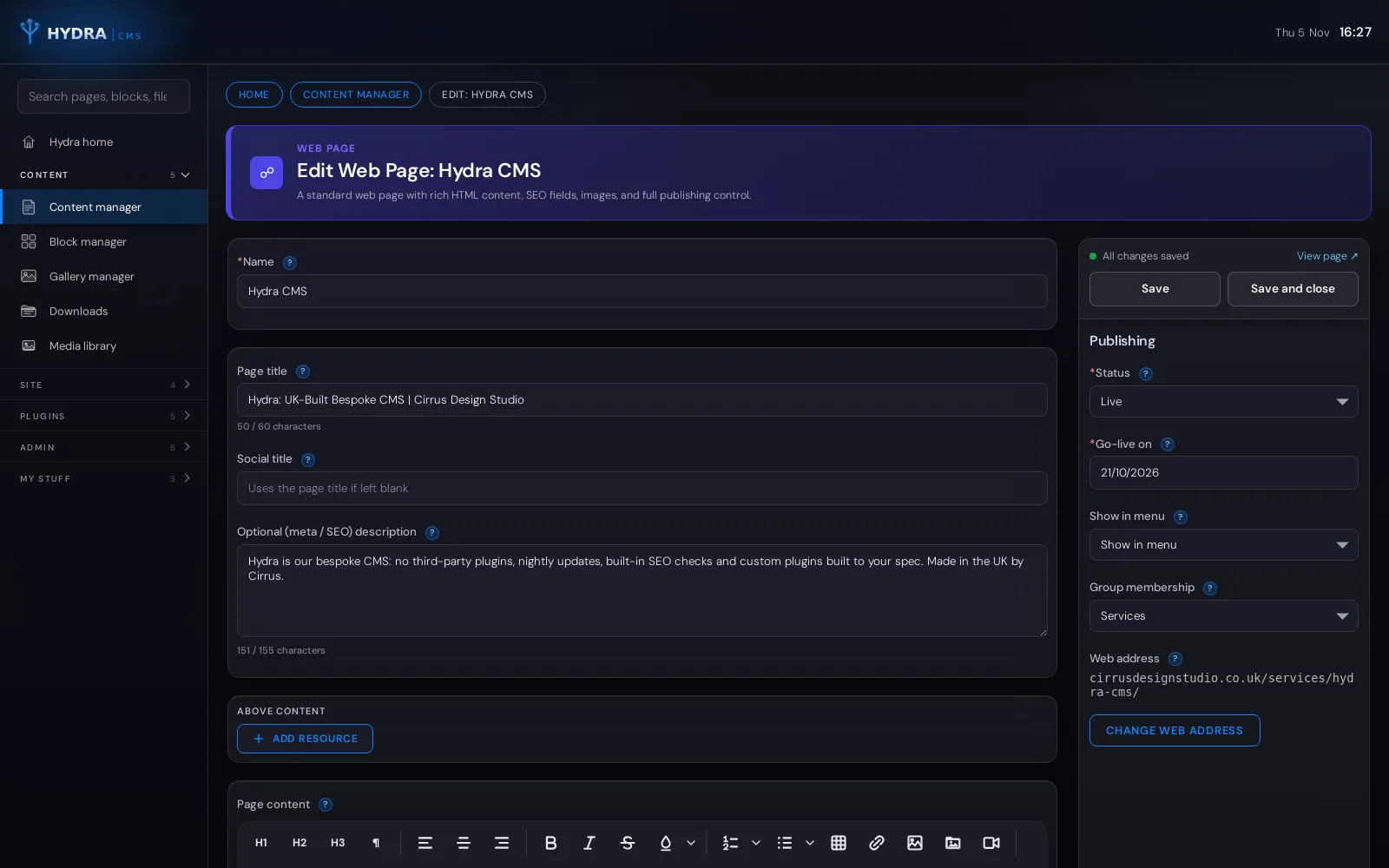
Under every page, Search preview and checks shows how it is likely to appear in Google and ticks off the basics as you write. They are guidance, not rules, so you stay in charge of your own words.
custom plugins/
Custom Hydra plugins, built to your specification
Need your website to do something specific to your business? We design and build custom plugins for Hydra to your exact requirements: a product catalogue, an online shop, a members’ document library, a portfolio, a booking or quoting tool, or a link to your own bespoke business system. Each one appears in Hydra beside your pages and blocks, works the same way, and is switched on for your site only.
They are also far more secure than the plugins available for most content management systems. A typical plugin marketplace holds tens of thousands of add-ons written by anyone, of any quality, many of them no longer maintained. A Hydra plugin is written by the team that wrote Hydra itself.
why they’re safer/
Built to the same standard as Hydra itself
- Written, reviewed and tested by us, never bought from an anonymous marketplace
- Uses Hydra’s own sign-in, roles, audit log and content filtering, so it inherits every safeguard
- Updated alongside Hydra every night, so it can never be abandoned or fall out of date
- Contains only the features you asked for: less code means less to attack
- Installed only on your website, so it isn’t a well-known target for automated attacks
how it works/
From your idea to a working feature
Tell us what you need it to do and who will use it. We agree a clear specification and a fixed scope, build and test the plugin on a staging copy of your site, then switch it on and show your team how it works.
the honest comparison/
Why a bespoke CMS beats an off-the-shelf one
Off-the-shelf content management systems are built to suit millions of websites, so they do a little of everything and rely on plugins to do the rest. Each plugin comes from a different developer, updates on its own timetable and can break the others. That’s where most hacked, slow and half-working websites come from. Hydra takes the opposite approach.
Off-the-shelf CMS (WordPress, Joomla and the like)
Built for every website.
Patched together for yours.
- No: Core features depend on plugins from many different developers
- No: Out-of-date plugins are the most common way websites get hacked
- No: Updates are left to you, and one can break the site
- No: Page builders add weight that slows every page down
- No: Crowded admin screens built for every possible use
- No: SEO, forms, security and analytics each need another plugin
- No: Premium plugins and themes add yearly licence fees
- No: A well-known target: automated attacks look for it by default
Hydra, the Cirrus bespoke CMS
Built by us.
Looked after by us.
- Yes: Every feature written, tested and supported by one team
- Yes: No third-party plugins to go stale or open security holes
- Yes: Updates install themselves overnight, with a log if anything needs a look
- Yes: Your website is hand-built, so pages stay light and fast
- Yes: Clear screens that show your team only what their role needs
- Yes: SEO checks, forms, analytics and security built in from the start
- Yes: New features added to fit your business, not bought off a shelf
- Yes: UK-built, with support from the people who wrote it
security/
Secure by design, not by add-on
Security in Hydra isn’t a plugin you remember to install. It is part of how every screen works, and it is kept current on every site automatically.
- Strong passwords only, with a strength meter that works in your browser
- Accounts pause after repeated wrong passwords, and every pause is logged
- Optional sign-in with Google or Microsoft
- Editor and Administrator roles, so people only see what they need
- Scripts and embeds are stripped from editors’ content on save
- See and revoke every browser your account is signed in on
- Changing a password signs out every other browser at once
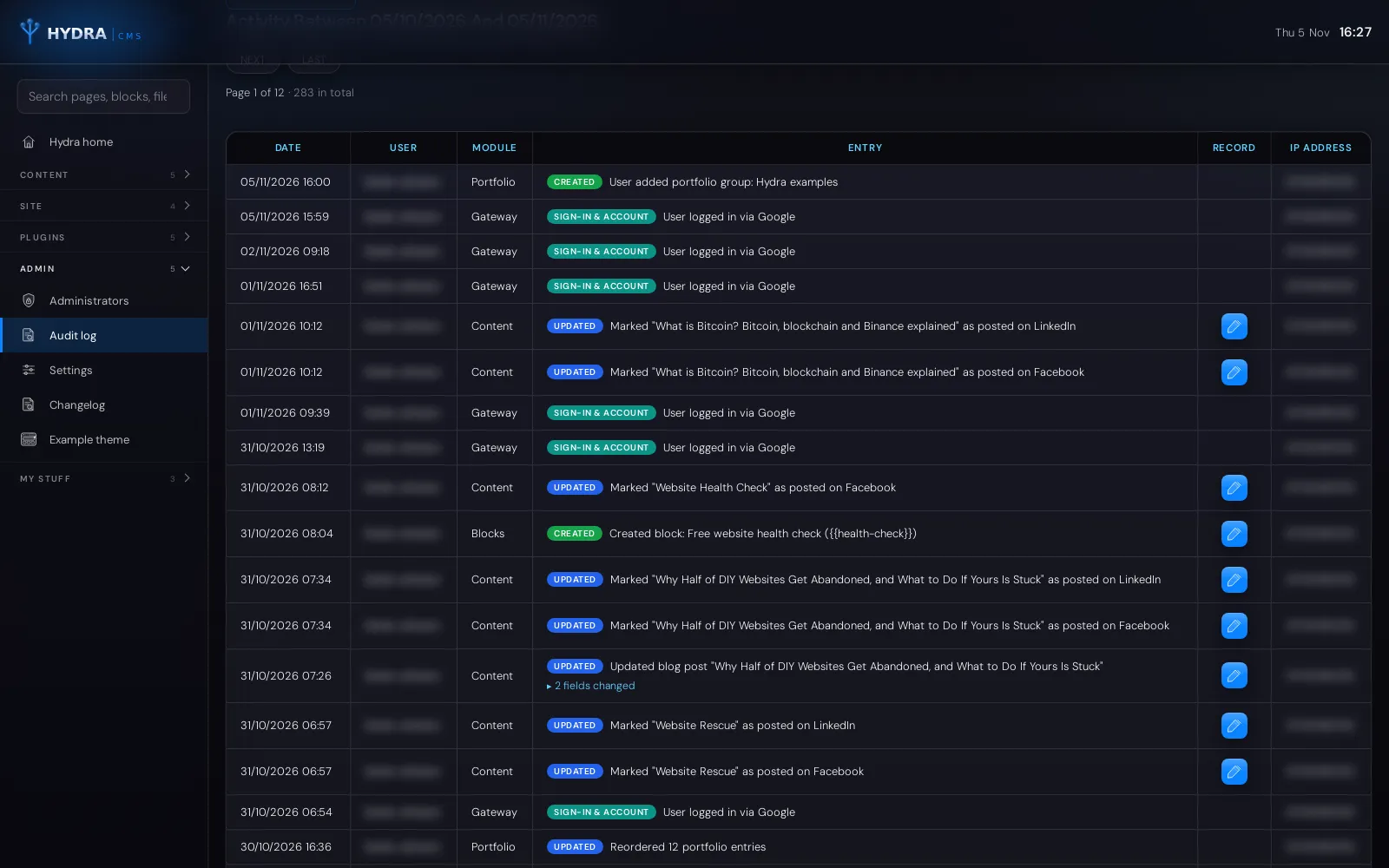
- An audit log of who changed what, with the old and new values side by side
- Form spam is filtered before it reaches your inbox
- Automatic sign-out after a period of inactivity, with a warning first
how it works/
From first conversation to a website you run yourself
Plan
We learn how your business works, what your website needs to do and who will be keeping it up to date.
Design and build
We design your website from scratch and build it by hand on Hydra, with any extensions your business needs.
Train
We fill it with your content, show your team how to edit it, and leave them with Hydra’s built-in user manual.
Look after
Hydra updates itself every night, and we stay on hand for changes, new features and advice as you grow.
questions we’re often asked/
Hydra CMS questions
Do I need technical skills to use Hydra?
No. If you can write an email and attach a photo, you can edit a Hydra website. Every screen works the same way, and the built-in manual explains each one in plain English.
Who looks after updates and security?
We do. New versions of Hydra install themselves overnight on every site, and the system reports if anything needs our attention. There are no plugins for you to keep up to date.
Can more than one person edit the website?
Yes. Add as many people as you need as Editors or Administrators. Every change is recorded in the audit log, so you can always see who did what and when.
Is Hydra good for SEO?
Yes. Every page has its own title, description, focus keyword, share image and robots setting, with live checks as you type, and Hydra writes the structured data search engines read. Your website also stays fast, which Google rewards.
Can you build a custom plugin for Hydra?
Yes. We build Hydra plugins to your specification, from a portfolio or an online shop to links with your bespoke business systems. Because we write them to the same standard as Hydra itself and keep them updated with it, they are far more secure than typical third-party CMS plugins.
How is Hydra different from Wix?
As a WIX Legend Partner we build on Wix too, and it’s a great fit for many businesses. Hydra is for websites that need a fully bespoke design, tighter control of data and hosting, or features that tie into your own systems.
talk to us/
Want a website your team can actually run?
Tell us about your business and your current website. We’ll show you Hydra in action and tell you honestly whether it, Wix or something else is the right fit. We’ll come back within one working day.
Explore our services
-

Cloud Based Business Systems
Bespoke cloud systems, custom CRMs, client portals and inspection apps for businesses across the UK. Fixed price, no per-seat fees. Free review. Learn more -

Website Design
Fixed-price, custom website design in Dorset from a Bournemouth studio. Fast, accessible sites that rank on Google and in AI search. Free consultation. Learn more -

Digital Marketing
Google Partner SEO, Google Ads and social media from Bournemouth, Dorset. Get found on Google Maps and in AI search, with clear reports. Free marketing review. Learn more -

Legacy Systems
Legacy system conversion for UK businesses: we move ageing databases, Access and desktop software onto secure, modern cloud systems without losing data. Learn more -

Hydra CMS
Hydra is our bespoke CMS: no third-party plugins, nightly updates, built-in SEO checks and custom plugins built to your spec. Made in the UK by Cirrus. You’re here -

Website Rescue
Website rescue for stuck Wix or WordPress sites. A WIX Legend Partner finishes your site or moves you to Hydra, a simpler, secure CMS. Free advice. Learn more